
Skip to content
Tech Digest

Links:

casino sites not on gamstop
top £5 casinos outside GamStop 
400 deposit bonus casino offer 
fishin frenzy not on GamStop guide 
GamStop Free Casino Sites
Best Non GamStop Casinos 
  • Mobile
    • Acer
    • Asus
    • HTC
    • Huawei
    • iPhone
      • iPhone apps
      • iPhone accessories
    • Android
      • Android apps
    • iPad
      • iPad accessories
      • iPad apps
    • Tablet
      • Tablet PC
    • Samsung galaxy
  • Home appliances
    • Home audio
    • Home cinema
    • Home security
  • Future
    • Internet Of Things
    • Wearables
    • Drones
    • Smartwatches
    • Gadgets
      • Baby Gadgets
      • Celebrity Gadgets
      • Stupid Gadgets
      • Travel Gadgets
      • World Cup gadgets
    • 3D Printing
    • Augmented reality
    • Old School Gadgets
    • Cryptocurrencies
    • Crowdfunding
    • Motoring
    • Space
    • Transport
    • Vehicles
  • Media
    • Apps
      • Android apps
      • iPad apps
      • iPhone apps
    • Twitter
    • Google
    • Internet
    • Skype
    • Software
    • Video Converter
    • Spotify
    • Music
    • Websites
    • Yahoo
  • Transport
    • Electric Vehicles
    • Car stuff
  • security
  • Science
    • Space
  • Broadband
  • ABOUT US

TECH PENTATHLON: How to work from home during the London 2012 Olympic Games

18 July 201227 July 2021 Gerald Lynch Features, Software, Tech Digest news
Share

img_work from home.jpg
(Pic from Gananci.)

review-line.JPGForget the naysayers; the London 2012 Olympic Games are going to be great. Sure, it’s been expensive, and some of the organisational stuff has been fluffed slightly, but it’s gonna be a hell of a show, with the world’s greatest living athletes all duking it out.

What isn’t going to be easy however, particularly for Londoners, will be getting to work. There are expected to be an extra million tourists using London’s public transport system every day while the games are on, while roads are being diverted and certain lanes cut off for all but prioritised Olympians and officials. The commute is going to be a nightmare.

But in this web-connected world of apps and clouds, it needn’t mean your work or business has to ground to a halt. There are plenty of ways to get the job done from the comfort of your home. And you never even have to get out of your pyjamas either! As part of the Tech Digest Tech Pentathlon, we highlight some useful tools for working from home during the games.
review-line.JPG
l_Parallels_Desktop_7_for_Mac___Parallels_Mobile_on_iPad_iPhone_and_iPod_touch.jpg
Virtualise your work desktop with LogMeIn or Parallels 7

LogMeIn Pro is a great service if you’ve got to have access to your exact work desktop while at home. A remote desktop virtualisation application, it gives you full control of a remotely located PC from either a home machine or mobile devices like tablets and smartphones.

The functionality offered by LogMeIn is really impressive. As well as full access to your desktop applications and files through a very intuitive UI, it fully supports HD video and audio streaming, makes synchronizing large databases of files very simple, offers screen sharing with colleagues and even local printing of remotely stored files.

While LogMeIn as standard supports iOS devices, pair the software with the LogMeIn Ignition mobile apps and you extend its potential even further with full Android and Windows Phone 7 support.

If you’re a Mac user, things can be a pain as many offices use Window based systems, making some programs you use regularly for work inaccessible through Mac OS X. If that’s a problem, pick up Parallels Desktop 7 for Mac

Parallels lets Mac users create a virtual Windows desktop on their Apple machines, and run both side by side, or in “parallel” if you prefer. It effectively puts all Windows applications at the fingertips of Mac users. Though Mac OS X’s built in Bootcamp functionality is similar, it locks you into one operating system or the other, making working across both simultaneously impossible.

Using hypervisor technology, each operating system (when in use) is able to harness practically all the machine’s power, meaning even intensive applications run near their maximum potential. There’s even support for Chrome, Ubuntu and other operating systems, including the latest Windows 8 preview build.

Parallels offers further flexibility when paired with the Parallels Mobile app. With it, you can access all your Mac and Windows functionality from an iPad, iPhone or iPod touch, making it just as easy to work down the pub as it is your home office during the sporting festivities.

“Planning ahead to minimise disruption during the Games is vital,” said Kim Johnston, vice president of marketing for desktop virtualisation and Mac at Parallels.

“It is important for businesses and workers to quickly look at technology they can simply implement in the time left to help ensure they can work as productively as possible. For example, the ability to run Mac and Windows applications simultaneously on one computer and access them remotely via iPad and iPhone can give workers the flexibility to be productive from anywhere.”
cloud-services.png
Use cloud storage services like Google Drive, iCloud, Dropbox and SkyDrive

The days of having to back up all your files to DVDs and external hard drives are over. We’ve entered the age of cloud storage, making it easier than ever to work from home, with all your important documents backed up and synced automatically. Cloud storage services are simple to use, and many offer sizeable amounts of free storage alongside their premium offerings. Four popular services are Google Drive, Apple’s iCloud, Dropbox and Microsoft’s SkyDrive.

Dropbox is our personal favourite. It easily lets you share folders for collaborative projects, drag-and-drop files for syncing, password-protect shared folders and automatically sync across multiple computers and devices. It uses an API that many other app and software developers already integrate into their own tools too. Though it only offers an initial 2GB of free storage, you can quickly bump that up to 18GB of free storage through a referral incentive. Premium paid for options are also available. A particularly snazzy feature for mobile users is that Dropbox will automatically sync your camera shots if you let it, meaning you never need to dig out that sync cable again. As well as Windows and Mac desktop clients, Dropbox supports Android, iOS and BlackBerry mobile.

Google Drive offers 5GB of free cloud storage, and supports public file sharing, file encryption and drag-and-drop syncing among many other features. Integrating Google Docs, you’ve also got access to a great web based word processor, and opens 30 different file types right inside your browser. In terms of mobile support, so far Google have only stumped up a dedicated Android app. There is also 10GB file size limit, that may turn off video editors. Again premium offerings are available.

Apple’s iCloud gives 5GB of free storage, and is locked into Apple’s ecosystem meaning it only works across iOS and Mac OS X devices. However, it seamlessly syncs documents across devices, and integrates with the Time Machine back-up service so that any changes you make to a file don’t have to be irreversibly destructive. Its scope is limited, but in true Apple style it handles things so well behind the scenes that you’ll appreciate its simplicity. Further storage space can be bought too.

Microsoft’s SkyDrive offers the most free storage with its 7GB, with its main draw being how well it syncs Office documents from Word, Excel and Powerpoint. It’s similar to iCloud in the way it’s best suited to Microsoft’s own products, but in-browser document editing functions give it the edge.
mindmeister3.png
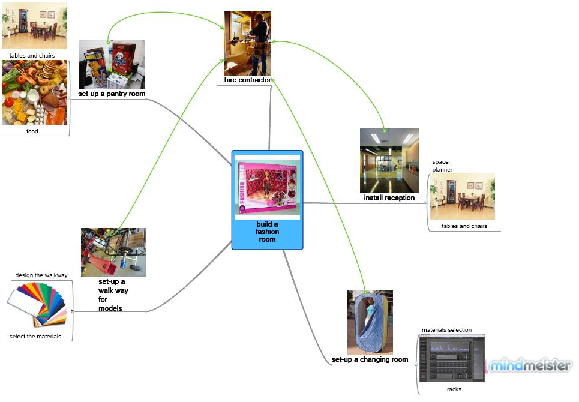
Collaborate with apps like Google Docs and MindMeister

Web apps make collaborating online a piece of cake. Google Drive is the new home for Google Docs, a web-based document editor that lets you share a document with your colleagues and work on it and revise it in real time, letting you see changes being made instantly, and by whom. It also allows you to create and collaborate on word documents, spreadsheets, presentations and more. It’s not as fully-featured as Microsoft’s Office package, but what it lacks in functionality it easily makes up for with convenience and the fact that it’s totally free.

If you need a more feature-rich, visual collaborative program, try MindMeister. Focussing on mind-mapping, it lets you quickly and effectively plan a project, with a video-style scrubber for rewinding through the history of each project’s revisions and comments. It’s not free though, setting you back £14.99 a month for the business level plan. Individuals can use the software for personal use at £4.99 a month. There’s also a pro tier at £9.99 and all can benefit from a 30-day free trial.
skype-facetime.jpg
Hold video conferences with Skype and FaceTime

If you still need to have a face-to-face meeting, there are plenty of free-to-use video conferencing apps. Skype is the most popular, with free one-to-one video calling, VOIP conference calling and instant messaging, as well as reduced rates to landlines and mobiles. Cough up £5.99 a month (or just £2.99 a month if you opt in for a 12-month deal) and you can also add group video conferencing and group screen sharing to the mix too. It’ll make your working world feel a lot smaller. As well as Mac and PC clients, Skype is available on a wide-range of mobile platforms.

FaceTime is another free video calling app that’s exclusive to Apple devices. Users of iOS mobile devices with a front-facing camera or a Mac running OS X 10.6.6 and higher can use the service, with FaceTime pre-installed on the devices.

Top Image Credit: http://www.home-based-business-4u.com

For latest tech stories go to TechDigest.tv

Share this:

  • Click to email a link to a friend (Opens in new window) Email
  • Click to share on Facebook (Opens in new window) Facebook
  • Click to share on Pinterest (Opens in new window) Pinterest
  • Click to share on LinkedIn (Opens in new window) LinkedIn
  • Click to print (Opens in new window) Print
  • Click to share on Reddit (Opens in new window) Reddit
  • Click to share on X (Opens in new window) X
  • Click to share on Tumblr (Opens in new window) Tumblr
  • Click to share on Pocket (Opens in new window) Pocket

Like this:

Like Loading...

Related Posts


Discover more from Tech Digest

Subscribe to get the latest posts sent to your email.

Tagged 2012 olympics Android APple cloud storage cloud syncing desktop sharing Dropbox Facetime Google google docs Google Drive iCloud ipad IPhone IPod LogMeIn LogMeIn Ignition London 2012 London 2012 Games London 2012 Olympic Games Mind Meister MindMeister Office Olympics olympics 2012 Parallels 7 Parallels 7 for Mac remote desktop Skydrive Skype Windows Windows 8 Windows Phone 7 Work from home

Post navigation

Logic3 announces Ferrari headphones and earphones
Apple must publicly admit iPad patent case defeat against Samsung, rules judge
Recent Posts
  • Google to launch first AI glasses in 2026, decades after Glass failure
    Google to launch first AI glasses in 2026, decades after Glass failure
  • EU investigates Google over AI summaries, Australia’s social media ban for Under 16s begins
    EU investigates Google over AI summaries, Australia’s social media ban for Under 16s begins
  • How Safe Are Apps?
    How Safe Are Apps?
  • Top 5 tech trends for 2026: The year of truth for AI
    Top 5 tech trends for 2026: The year of truth for AI
  • Netflix-Warner Bros Studio deal ‘could be problem’, Smart unveils hybrid #6
    Netflix-Warner Bros Studio deal ‘could be problem’, Smart unveils hybrid #6
  • Trainline introduces AI-driven tools for train travellers
    Trainline introduces AI-driven tools for train travellers
  • Taiwan to block China’s RedNote app, Deepfake doctors spreading health misinformation
    Taiwan to block China’s RedNote app, Deepfake doctors spreading health misinformation
Categories
Archives
Text Links:

The most reputable non GamStop casinos UK that offer games to your gaming adventure


Contact Us

Tech Digest, Tel: +44 7885 836842. [email protected]

  • Home
  • Cookie Policy
  • Privacy Policy
  • Terms and Conditions
Proudly powered by WordPress | Theme: NewsAnchor by aThemes.

Discover more from Tech Digest

Subscribe now to keep reading and get access to the full archive.

Continue reading

We use cookies on our website to give you the most relevant experience by remembering your preferences and repeat visits. Cookies are used for ads personalisation. By clicking “Accept”, you consent to the use of ALL the cookies. For more details please consult our Cookie Policy and Privacy Policy pages.
.
Cookie Settings Accept
Manage consent

Privacy Overview

This website uses cookies to improve your experience while you navigate through the website. Out of these, the cookies that are categorized as necessary are stored on your browser as they are essential for the working of basic functionalities of the website. We also use third-party cookies that help us analyze and understand how you use this website. These cookies will be stored in your browser only with your consent. You also have the option to opt-out of these cookies. But opting out of some of these cookies may affect your browsing experience.
Necessary
Always Enabled
Necessary cookies are absolutely essential for the website to function properly. These cookies ensure basic functionalities and security features of the website, anonymously.
CookieDurationDescription
cookielawinfo-checkbox-advertisement1 yearSet by the GDPR Cookie Consent plugin, this cookie records the user consent for the cookies in the "Advertisement" category.
cookielawinfo-checkbox-analytics11 monthsThis cookie is set by GDPR Cookie Consent plugin. The cookie is used to store the user consent for the cookies in the category "Analytics".
cookielawinfo-checkbox-functional11 monthsThe cookie is set by GDPR cookie consent to record the user consent for the cookies in the category "Functional".
cookielawinfo-checkbox-necessary11 monthsThis cookie is set by GDPR Cookie Consent plugin. The cookies is used to store the user consent for the cookies in the category "Necessary".
cookielawinfo-checkbox-others11 monthsThis cookie is set by GDPR Cookie Consent plugin. The cookie is used to store the user consent for the cookies in the category "Other.
cookielawinfo-checkbox-performance11 monthsThis cookie is set by GDPR Cookie Consent plugin. The cookie is used to store the user consent for the cookies in the category "Performance".
CookieLawInfoConsent1 yearCookieYes sets this cookie to record the default button state of the corresponding category and the status of CCPA. It works only in coordination with the primary cookie.
viewed_cookie_policy11 monthsThe cookie is set by the GDPR Cookie Consent plugin and is used to store whether or not user has consented to the use of cookies. It does not store any personal data.
Functional
Functional cookies help to perform certain functionalities like sharing the content of the website on social media platforms, collect feedbacks, and other third-party features.
CookieDurationDescription
__atuvc1 year 1 monthAddThis sets this cookie to ensure that the updated count is seen when one shares a page and returns to it before the share count cache is updated.
__atuvs30 minutesAddThis sets this cookie to ensure that the updated count is seen when one shares a page and returns to it before the share count cache is updated.
Performance
Performance cookies are used to understand and analyze the key performance indexes of the website which helps in delivering a better user experience for the visitors.
CookieDurationDescription
__jid30 minutesDisqus sets this cookie to remember the user's Disqus login credentials across websites that use Disqus.
Analytics
Analytical cookies are used to understand how visitors interact with the website. These cookies help provide information on metrics the number of visitors, bounce rate, traffic source, etc.
CookieDurationDescription
at-randneverAddThis sets this cookie to track page visits, sources of traffic and share counts.
disqus_unique1 yearSet to record internal statistics for anonymous visitors.
uvc1 year 1 monthaddthis.com sets this cookie to determine the usage of addthis.com service.
_ga1 year 1 month 4 daysGoogle Analytics sets this cookie to calculate visitor, session and campaign data and track site usage for the site's analytics report. The cookie stores information anonymously and assigns a randomly generated number to recognise unique visitors.
_gat_gtag_UA_*1 minuteGoogle Analytics sets this cookie to store a unique user ID.
_ga_*1 year 1 month 4 daysGoogle Analytics sets this cookie to store and count page views.
_gid1 dayGoogle Analytics sets this cookie to store information on how visitors use a website while also creating an analytics report of the website's performance. Some of the collected data includes the number of visitors, their source, and the pages they visit anonymously.
__gads1 year 24 daysGoogle sets this cookie under the DoubleClick domain, tracks the number of times users see an advert, measures the campaign's success, and calculates its revenue. This cookie can only be read from the domain they are currently on and will not track any data while they are browsing other sites.
Advertisement
Advertisement cookies are used to provide visitors with relevant ads and marketing campaigns. These cookies track visitors across websites and collect information to provide customized ads.
CookieDurationDescription
IDE1 year 24 daysGoogle DoubleClick IDE cookies store information about how the user uses the website to present them with relevant ads according to the user profile.
loc1 year 1 monthAddThis sets this geolocation cookie to help understand the location of users who share the information.
skimGUID10 yearsSet by Slimlinks, this cookie is a unique identifier provided to each device for log analysis to determine the number of unique users for various parts of skimresources.com.
test_cookie15 minutesdoubleclick.net sets this cookie to determine if the user's browser supports cookies.
_irsessionThis is a Pinterest cookie that collects information on visitor behaviour on multiple websites. This information is used on the website, in order to optimize the relevance of advertisement.
__gpi1 year 24 daysGoogle Ads Service uses this cookie to collect information about from multiple websites for retargeting ads.
Others
Other uncategorized cookies are those that are being analyzed and have not been classified into a category as yet.
CookieDurationDescription
wp_apipastDescription is currently not available.
wp_api_secpastDescription is currently not available.
xtc1 year 1 monthDescription is currently not available.
Save & Accept
Powered by CookieYes Logo
%d